


4.97.00 Reviews
App Specs
- Version
- 26.0.0.0.50
- Updated On
- License
- Free
- Downloads
- 10,000+
- Developer
- Meta Platforms, Inc.
- Categories
- Art & Design
- Platform
- Android
Screenshots
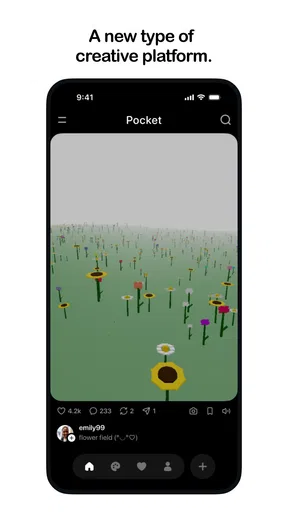
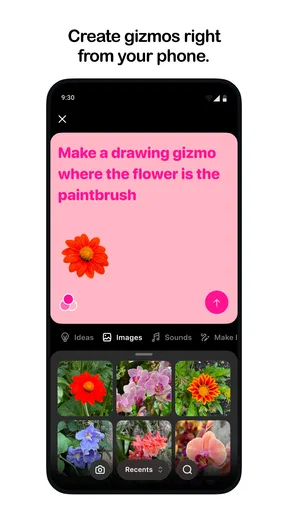
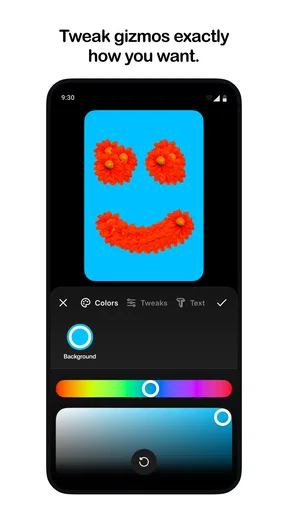
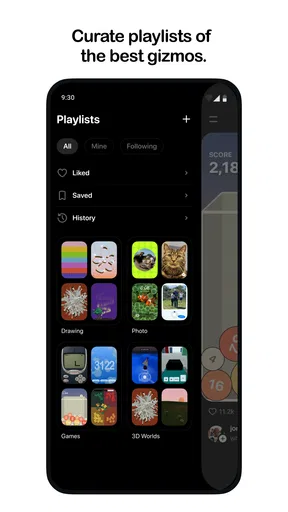
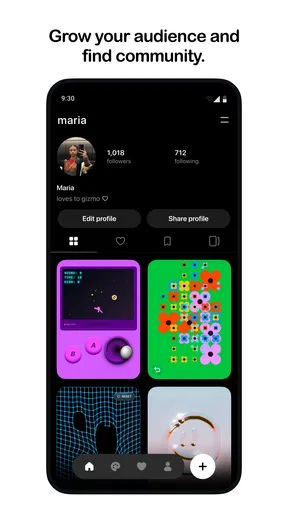
 Analysis by AppCompare
I approached Pocket as a small creative playground rather than a conventional drawing or design suite. Its focus is making and sharing “gizmos,” which gives it a different feel from a normal sketchbook, photo editor, or professional illustration tool. The idea is appealing when I want to experiment quickly, build something playful, and show it to someone without turning the process into a full design project.
That narrow identity is also important when deciding whether it deserves space on your phone. Pocket is a free Art & Design app from Meta Platforms, Inc., aimed at Teen users and available for devices running Android or iOS version 10 or later. It has reached over ten thousand installs and holds a 4.9 average from around six hundred ratings, so the visible response is encouraging, although the audience is still relatively small.
What using Pocket feels like in practice
The best way to understand Pocket is to think of it as a pocket-sized creative workshop. I would not open it expecting the layer management, precision tools, export controls, or deep editing workflow associated with established design software. Instead, the attraction is the low commitment: open it, make a compact visual idea, adjust it until it feels right, and share the result.
That makes the app especially suitable for people who enjoy visual experiments but are put off by complicated interfaces. A beginner can approach a gizmo as a finished little object rather than worrying about whether a drawing is technically polished. For a more experienced creator, the appeal is different: Pocket can work as a place to test a visual concept before rebuilding it in a more capable tool.
I found that distinction useful because it prevents the wrong comparison. Pocket is not trying to replace a full illustration package. It sits closer to a quick creative prompt, where speed and curiosity matter more than exhaustive control. If your goal is a finished poster, detailed character art, or production-ready branding, a dedicated design app remains the better choice.
A realistic everyday use case
Imagine having a short break while commuting or waiting for an appointment. You have an idea for a tiny animated-looking object, a strange visual symbol, or a playful concept you want to show a friend. Opening a professional editor in that situation can feel excessive: there are too many panels, too many decisions, and too much setup before the idea becomes visible.
Pocket makes more sense in that moment. I would use it to turn the rough thought into something shareable, then send it to the friend who inspired it. The value is not necessarily the final artwork; it is the short path between “what if?” and a visible result. That kind of immediate feedback can help decide whether an idea deserves more work elsewhere.
Worth Reading Before You Choose

Baby Panda World Brings Quick Play to Modern Phones, but Its Game Library Feels Busy

ESPN’s Live Game View Makes Following Close Games Easier

QuizzLand Review: A Good Fit for Short Trivia Breaks, Not Every Player

Basketball Stars: Multiplayer Is Fast, but Can It Recover When Matches Go Wrong?

WEBTOON Turns Phone Updates Into a Better Reading Routine

Link to Windows Runs on Shared Habits, Not Social Feeds
There is a useful social angle here too. Sharing a compact creation can be easier than explaining a half-formed concept in text. A friend can react to the actual object, suggest a variation, or use it as the starting point for another idea. For casual creative exchanges, that is more natural than sending a screenshot of a complicated editing canvas.
Trust starts with what the app visibly asks from you
Because Pocket is a Meta product, I would pay closer attention to account and sharing choices than I would with a completely offline sketchpad. The developer name is visible, and the app’s purpose clearly includes sharing, so I would pause during setup and review every screen that concerns sign-in, audience, publishing, or connections to other services.
My rule is simple: I would not treat a creative app as automatically private just because the creations are small or playful. A gizmo can still reveal personal taste, a project idea, a location clue, or something made for a specific person. Before publishing, I would check who can see it and whether the intended audience matches the actual audience shown in the interface.
This is where Pocket’s compact format creates an unusual trust question. A quick creation feels harmless, which can encourage quick sharing. I think that is precisely when users should slow down for a moment. The creative process can be casual, but the visibility decision should be deliberate.
Controls I would check before making Pocket part of my routine
The most important controls are the ones that affect identity, visibility, and account access. I would look for a clear way to understand whether a profile is required, whether a creation can remain private, and how to change the audience after sharing. I would also review the device-level permissions presented during installation or first use instead of approving everything automatically.
Those checks are not busywork. They tell me whether Pocket gives me meaningful choices or simply moves me toward public participation. A good creative workflow should let me decide when an experiment is personal, when it is ready for friends, and when it is suitable for a wider audience.
I would also keep an eye on notifications. A creative platform can become distracting if every reaction or invitation interrupts the day. If Pocket offers notification categories, I would keep only the ones that help me return to my own projects and turn off the rest. If the operating system provides notification controls, those are worth using immediately rather than waiting for the app to become noisy.
Privacy-sensitive moments are easy to overlook
The first sensitive moment is setup. This is when I would read the wording around account creation, connected services, and permissions. The second is creation: I would avoid placing private names, personal messages, school details, or identifiable surroundings into a gizmo unless I was comfortable with those details being shared.
The third moment is publication. Before tapping a final share control, I would inspect the destination and audience. A creation made for one friend should not automatically become a public post simply because public sharing is the fastest option. I would also remember that screenshots and reposts can move an image beyond the original setting, so an apparently limited audience is not the same as permanent control.
The fourth moment is leaving the service. If I stopped using Pocket, I would check the account area for sign-out, deletion, or content-management options and review the app’s permissions in the device settings. I would not assume that uninstalling an app answers every account or publishing question. The practical habit is to clean up deliberately, especially if I had created or shared anything personal.
These are sensible precautions rather than accusations. The available product details establish Pocket’s developer, purpose, age category, price, and technical requirements, but they do not give me a reason to make broader claims about how every permission or data process works. I would therefore judge the app by the choices it visibly presents on my device and keep my own sharing conservative.
Where Pocket has a real advantage over familiar alternatives
Compared with a traditional drawing app, Pocket’s strongest potential advantage is focus. A standard canvas encourages a long session and often assumes that the user wants to refine every detail. Pocket’s gizmo concept is better suited to small ideas, playful variations, and creations that are complete because they communicate one thought clearly.
Compared with a social network, its creative purpose is more direct. I would rather make something first and share it second than scroll through a feed while hoping inspiration appears. That said, the social side can still become the dominant experience if the app emphasizes discovery more than making. My preference would be to use Pocket with a personal project in mind, not as another stream to check repeatedly.
Compared with a professional design tool, Pocket should win on approachability, not precision. If I need exact alignment, detailed typography, complex composition, or dependable production output, I would move to software built for those tasks. Trying to force Pocket into that role would create frustration and make its simplicity feel like a weakness.
Three habits that make the experience more useful
First, I would treat each gizmo as a visual note rather than a final masterpiece. Giving myself a short goal—one object, one mood, or one visual joke—keeps the session focused. This also makes it easier to compare different attempts and decide which idea deserves further development in another app.
Second, I would separate experimentation from sharing. I would make several rough versions privately, then publish only the one that communicates best. This is a better workflow than sharing the first attempt and feeling pressure to keep polishing it in public. It also reduces the chance of exposing a half-finished idea accidentally.
Third, I would use Pocket as a bridge between conversation and design. If a friend describes an idea that is difficult to explain, I could build a quick visual response instead of writing a long message. Conversely, if a gizmo suggests a larger project, I would preserve the concept in a more suitable editor rather than expecting Pocket to handle every later stage.
A fourth habit is particularly useful for younger users: decide in advance what kinds of personal material will never be included. Since the content rating is Teen, families and educators may want to discuss audience settings, recognizable details, and respectful sharing before treating the app as a casual creative space.
What the current release means for device owners
Pocket is free, which makes trying it straightforward, but free access does not remove the need to consider attention, account choices, and sharing behavior. The current version is 26.0.0.0.50, and the listed minimum operating-system requirement is version 10. I would check compatibility before recommending it to someone using an older phone or tablet, especially if the device is kept on an earlier system for stability or security reasons.
The release date shown for the app is August 20, 2026. That makes the visible install base relatively early in its life, even though the average feedback is strong. I would interpret the 4.9 average as a promising signal rather than proof that every workflow is mature. A smaller community can mean fewer established tutorials, fewer examples to learn from, and less certainty about how the product will fit long-term creative habits.
That early-stage feeling may be positive for people who like discovering new tools. It may be less attractive to professionals who need a dependable archive, a large support community, or a workflow that has already been tested across many types of projects. In that situation, I would keep Pocket as an experiment rather than making it the only place where important work lives.
Who should try it, and who should skip it
I would recommend Pocket to curious beginners, casual creators, students exploring visual ideas, and people who enjoy making small shareable objects without opening a complex editor. It also makes sense for anyone who wants a low-pressure creative break or a quick way to respond visually during a conversation.
I would be more cautious about recommending it to a professional illustrator, a brand designer, or someone preparing files for a client. Those users usually need predictable technical controls and a clear path from draft to final delivery. Pocket’s appeal is the opposite: it is lightweight, immediate, and centered on the gizmo as an expressive unit.
I would also skip it if my main reason for installing an app is private offline drawing. Pocket’s identity is tied to making and sharing, so I would choose a conventional local sketchbook when keeping work away from social or account-based interactions matters more than experimentation.
My cautious verdict
After looking at Pocket as both a creative tool and a sharing platform, I see a focused app with a clear reason to exist. It is not valuable because it promises to replace every design program; it is valuable because it lowers the effort needed to turn a small visual idea into something another person can see.
I would install it for quick experiments, visual replies, and playful projects, while keeping more serious work in a dedicated editor. I would also review account prompts, permissions, audience controls, and notification settings before sharing anything personal. The smartest way to use Pocket is to keep the making spontaneous while keeping the privacy decisions intentional.
For a free Art & Design app with a Teen rating and an early but enthusiastic audience, that balance feels reasonable. My recommendation is positive for users who want a compact creative platform and are comfortable checking their sharing choices. If you need deep production tools or a strictly private canvas, another option will serve you better. For everyone else, Pocket is worth trying as a small, social-minded place to make ideas tangible.
Pros
- Save articles
- videos
- and pages for distraction-free reading later.
- Offline access makes saved content useful without an internet connection.
- Clean interface keeps saved items organized and easy to browse.
- Tags and search help manage a large personal reading library.
- Available across devices with syncing through your Pocket account.
Cons
- Some advanced discovery and customization features require Pocket Premium.
- Offline downloads can use considerable storage with media-heavy saved items.
- Syncing may occasionally take time when many items are saved at once.
- The reading layout may not perfectly preserve every website’s original design.
- Pocket’s future availability and feature support may depend on Mozilla’s plans.
FAQs for Pocket
What is Pocket and what can I use it for?
Pocket is a read-later app that lets you save articles, web pages, videos, and other online content in one place. After installing it, you can collect interesting material from your browser or supported apps and return to it whenever you have time. Its clean reading view also helps remove distracting page elements, making longer articles more comfortable to read.
Does Pocket work offline?
Yes, Pocket can be used offline for content that has already been saved and downloaded to your device. This is useful when traveling, commuting, or reading in areas with a weak internet connection. However, not every external element, video, image, or interactive feature is guaranteed to work without an internet connection, so it is best to open saved items online at least once.
Is Pocket free to download and use?
Pocket offers a free version with the main tools needed to save, organize, and read content later. Some additional features may require a paid subscription, depending on the current plan available in your region. Premium benefits can include a more personalized reading experience, advanced search or organization options, and access to extra customization features.
Can I synchronize my saved articles across Android, iPhone, and other devices?
Pocket supports account-based synchronization, allowing your saved items, tags, and reading progress to remain available across compatible devices. You need to sign in with the same Pocket account on each platform. Synchronization generally requires an internet connection, and newly saved or updated content may take a moment to appear everywhere.
Is Pocket safe and suitable for managing private reading lists?
Pocket is designed for saving and organizing online content, but users should still review its privacy settings before adding sensitive links. Saved pages are connected to your account, so protecting that account with a strong, unique password is important. Also remember that Pocket stores references to online content, and availability can change if the original publisher removes or restricts a page.


